
Your drive, remembered
Use GPS recording or manual entry. Opt-in automatic tracking uses location and motion permissions.
 Zebro Mile Tracker
A calmer way to keep a mileage log. Record a drive, separate business from personal, and turn your trips into a report you can actually use.
Use GPS recording or manual entry. Opt-in automatic tracking uses location and motion permissions.
Review unclassified drives and separate business travel from personal errands in a few taps.
Export your mileage as PDF or CSV, ready to review, keep with your records, or share with an adviser.
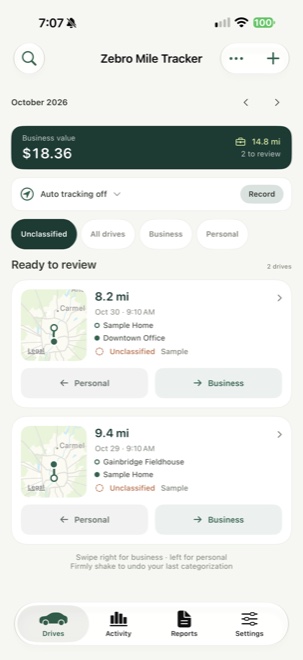 Actual app · Sample data
Simple at a glance. Useful in the details. Zebro Mile Tracker keeps the next step close, without losing sight of the bigger picture.
Start a drive recording, add one manually, or enable automatic tracking with the required permissions.
Review the route and mileage, then classify the drive as Business or Personal. Add details while they are fresh.
Choose a date range and export a CSV or PDF report. Review your log before using it for reimbursement or tax preparation.
Automatic tracking is optional and depends on the location and motion permissions you grant. You can also record a drive yourself or add one manually.
No. Estimates and classifications are recordkeeping aids. Eligibility and reimbursement rules depend on your situation; review the records with a qualified adviser when needed.
The current app stores drive records on your device. Exporting a report shares the information you choose with the destination you select.